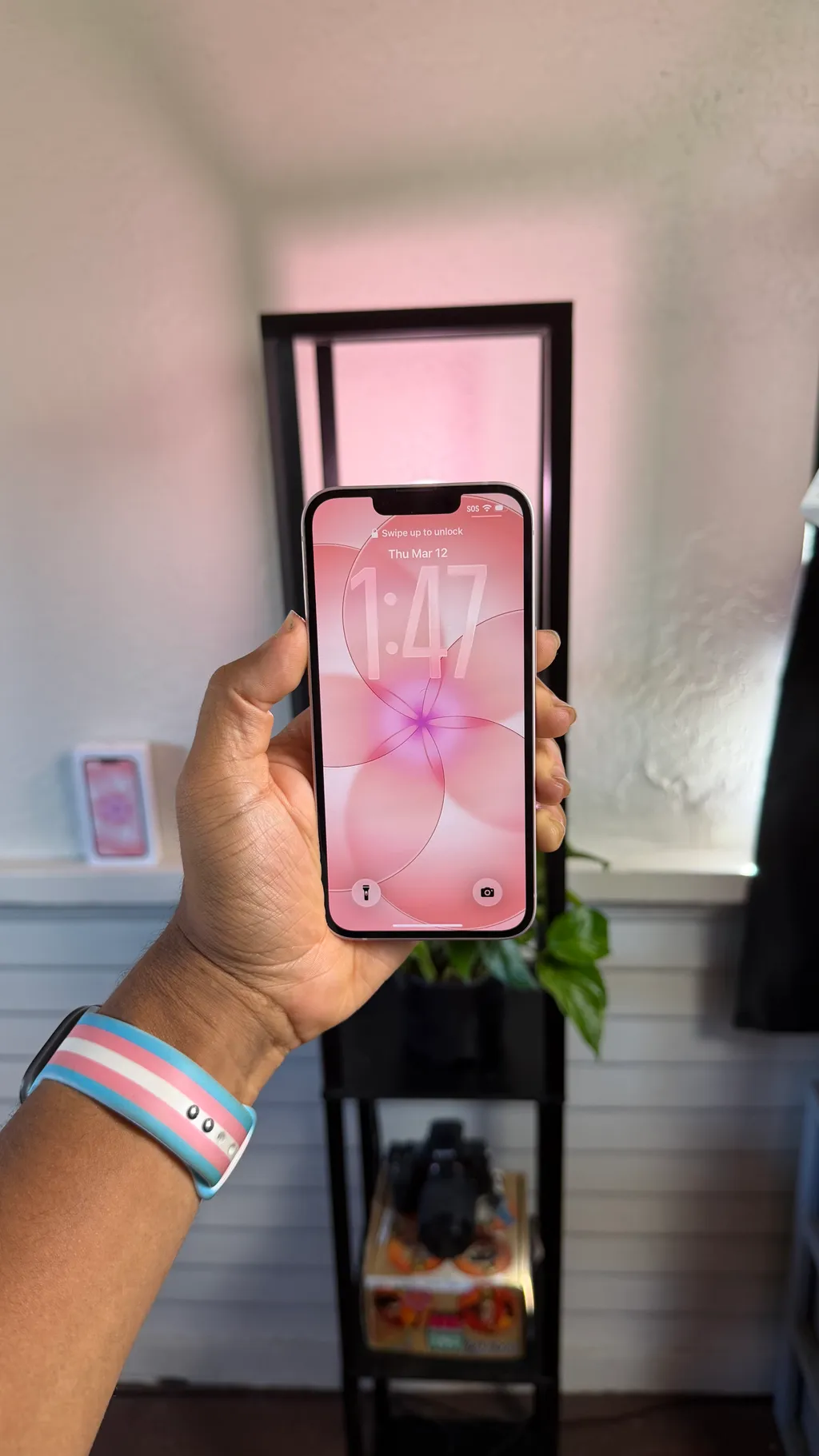
Unboxing the iPhone 17e: Your First Look at Apple's New Affordable Powerhouse
Unboxing the iPhone 17e in Soft Pink. Apple's most powerful affordable iPhone yet with the A19 chip, 48MP Fusion camera, MagSafe, and all-day battery.

Hey everyone, Justin here, and wow, do we have something exciting to unbox today! If you've been waiting for a new iPhone that blends power with a friendly price tag, the iPhone 17e might just be calling your name. We're diving into an unboxing and setup experience that will get you up close and personal with Apple's latest.
First Impressions: The iPhone 17e Packaging
Right off the bat, the packaging is classic Apple – sleek and minimalist. Our model today is the stunning new "soft pink" color, and it looks absolutely gorgeous on the box. You'll find the device photo front and center, with subtle iPhone branding on the sides and the iconic Apple logo. The back gives you a peek at the tech specs and, thankfully, two pull straps for that satisfying unboxing peel.
After a quick rip of both straps, the box opens effortlessly, revealing the star of the show:
"We've got the brand new iPhone 17e in the soft pink. You can see what it looks like right there. It is gorgeous. It's a brand new color."
Inside, alongside the phone, you'll find a USB-C to USB-C cable for charging and a quick start guide. Interestingly, this guide is more of a minimalist card, focusing on eSIM and hearing aid compatibility rather than detailed instructions. Looks like Apple expects us to be pros by now!
Tech Specs: iPhone 17e Soft Pink
Apple kept it simple and made it count. The iPhone 17e is powered by the A19 chip — the same silicon at the heart of the iPhone 17 lineup — paired with Apple's own C1X cellular modem for faster, more efficient 5G. With a 48MP Fusion camera, MagSafe support, and all-day battery life, this is Apple's most complete affordable iPhone yet. And yes, the Soft Pink finish is as clean as it looks on camera.
• Display: 6.1-inch Super Retina XDR OLED, 2532×1170 at 460 ppi, True Tone, Wide color (P3), 800 nits typical brightness and 1200 nits peak HDR. Ceramic Shield 2 front with 3× better scratch resistance.
• Chip: A19 with 6-core CPU (2 performance, 4 efficiency), 4-core GPU with Neural Accelerators, and 16-core Neural Engine. Built on 3-nanometer technology.
• Camera: 48MP Fusion camera system (26 mm, ƒ/1.6, optical image stabilization). Also enables a 12MP 2× Telephoto at 52 mm. Front camera: 12MP TrueDepth (ƒ/1.9, autofocus).
• Video: 4K Dolby Vision recording at up to 60 fps. Spatial Audio. Audio Mix. Wind noise reduction.
• Storage & RAM: 256GB/8GB or 512GB/8GB
• Battery: Up to 26 hours video playback; up to 21 hours streamed.
• Charging: USB-C fast charge — up to 50% in 30 minutes with a 20W adapter. MagSafe and Qi2 wireless charging up to 15W.
• Build: Aluminum design in Soft Pink, Ceramic Shield 2 front, glass back, IP68 water and dust resistance (6 meters, 30 minutes).
• Connectivity: Apple C1X modem with 5G (sub-6 GHz), Wi-Fi 6, Bluetooth 5.3, NFC, Face ID, dual eSIM.
• Software: iOS with Apple Intelligence — including Clean Up, Writing Tools, Genmoji, Image Playground, and Visual Intelligence. Action button included.
This phone is proof that "affordable" doesn't mean "compromise." The A19 chip, MagSafe, and that 48MP Fusion camera make the iPhone 17e feel closer to the flagship than any budget iPhone before it. The Soft Pink finish just makes the whole package feel personal.
A Closer Look at the Device Itself
Once we get that protective paper peel off, the iPhone 17e truly shines. Let's take a quick tour of its physical features:
- Side Buttons: Action button, volume up/down.
- Other Side: Power button.
- Bottom: Charging connector and speakers.
- Top: Nothing (clean design!)
- Front: Screen, camera, and the familiar notch.
- Back: Single camera, flash, and the iconic Apple logo.
Now, for the moment of truth – powering it on! A simple press and hold of the power button brings the Apple logo to life, signaling the start of our setup journey.
The Return of MagSafe and What It Means for You
One of the most exciting revelations about the iPhone 17e is the triumphant return of MagSafe! This feature was noticeably absent in last year's model, and its comeback is a huge win for users.
"The best part is that they brought back MagSafe... on the back of the phone there are magnets and you can attach your magnetic iPhone 17 to a charger, a wireless charger or a dock."
MagSafe adds a whole new level of convenience for wireless charging and accessories, making it easier than ever to power up and customize your device.
Setting Up Your New iPhone 17e
Getting started with your iPhone 17e is intuitive and user-friendly. Here's a rundown of the initial setup process:
- Greetings: The phone greets you in various languages. A simple swipe up starts the process.
- Language & Region: Select your preferred language (English for us) and country (United States).
- Face ID Setup: This is always a cool moment! Position your face in the frame and move your head in a circle. It's incredibly quick. You can also opt for a second scan for mask compatibility, but we skipped that for now.
- Passcode: Create a secure passcode for your device.
- Transferring Data: You have several options here – migrate from an Android, Mac, PC, another iPhone, or an iCloud backup. For this demo, we're setting it up as a completely new phone.
- Apple ID: This is crucial for App Store downloads, iCloud, and other Apple services. You can log in, create a new account, or set it up later in settings.
- Dark Mode: Choose between Light, Dark, or Auto mode (which adjusts based on the time of day).
- Apple Intelligence: Get ready for some smart features like live translation, visual intelligence, and enhanced writing tools. We'll hit continue on this exciting new addition.
- Notification Summaries: This beta feature uses AI to summarize notifications (messages, emails). It's incredibly handy, but Justin reminds us to be mindful of its beta status, especially for news, as AI can sometimes be inaccurate.
- Priority Notifications: A fantastic feature that analyzes importance and bumps critical alerts to the top of your notification stack, ensuring you never miss what truly matters.
- Emergency SOS & Crash Detection: Essential safety features carried over to keep you safe.
Phew! With the setup screens complete, we're greeted by the familiar home screen. Swiping around reveals the control center (from the right) and notifications (from the left). A simple swipe up from the lock screen and you're good to go!
The Verdict: A Powerful and Affordable Choice
Overall, the iPhone 17e is shaping up to be a fantastic option. The reintroduction of MagSafe is a game-changer, and the inclusion of advanced features like Apple Intelligence at an affordable price point makes this phone incredibly appealing.
"I'm really excited about this phone, especially bringing the Mag Safe back and bringing it at an affordable price... where you get some, you know, lovely power on your iPhone... and to be able to use some of the latest features that are typically reserved for the more expensive iPhones."
Whether you're new to the iPhone ecosystem or looking for an upgrade that offers premium features without breaking the bank, the iPhone 17e is definitely worth considering.
Let's Connect:
- Drop a comment on the YouTube video itself.
- If you’re looking to level up your own creative business, I’m available for hire. Let's build something together: jharris@envisionwith.me
Stay visionary,
Justin
Shot on iPhone.
This post was generated by AI (which can make mistakes) using the transcript of my video.
Powered by Apple Creative Studio.


